
Only in Mailussi
Things Mailussi does that Superhuman doesn't.
Copy a sign-in code
Press ⇧⌘C anywhere in Mailussi to copy the newest verification code from your mail. You don't have to open the message, and the code is ready to paste where you're signing in.

- Which code: the open conversation's code. If none is open, the newest code from the last 15 minutes. Otherwise, the code in the conversation you've selected.
- Kept private: clipboard history apps don't save the code.
addy.io aliases
If you use addy.io to give each site its own email address, Mailussi understands the mail it forwards to you.
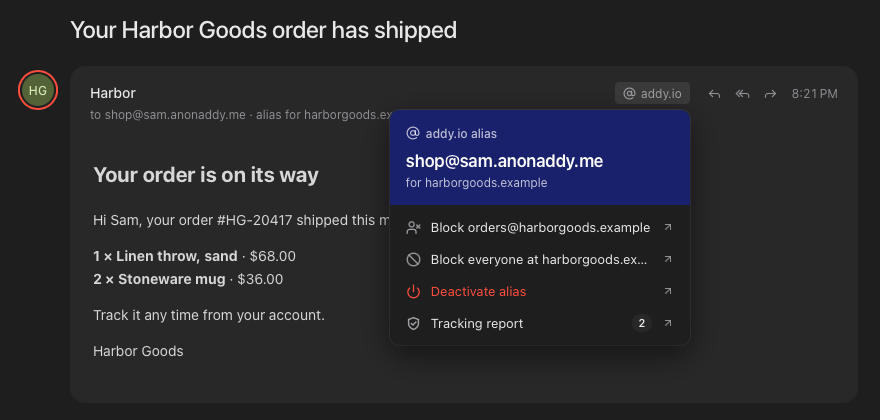
- The real sender: the message shows who actually sent it, not your alias. addy.io's banner is removed from the message.
- The alias: the To line shows which alias the mail came through and what it's for.
- One-click actions: the addy.io chip opens a menu to block the sender, block their whole domain, deactivate the alias or see addy.io's tracking report.
See who tried to track you
Mailussi strips tracking pixels from every message, so senders can't see when you opened their mail. When it removes any, a trackers removed chip appears in the message header. Click it to see each service that tried.
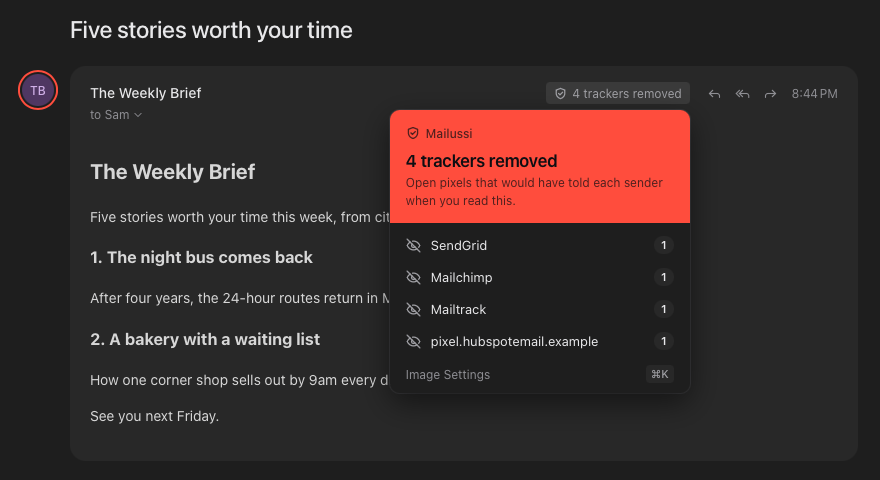
To block every remote image instead, open ⌘K → Image Settings.
More is on the way. Missing something you'd love? Tell us at hello@mailussi.app.